
How small and medium businesses can build a practical, phased Zero Trust strategy that actually works.
🔍 Introduction: Why Zero Trust Is More Than a Buzzword
Zero Trust is everywhere. Since 2021, governments, cybersecurity vendors, and IT leaders have touted it as the gold standard for modern cyber defence. At its core, Zero Trust means: “Never trust, always verify.”
But despite its popularity, most small and medium-sized businesses (SMBs) that set out to “implement Zero Trust” end up overwhelmed, misinformed, or stuck in pilot mode — wasting time and money on solutions they can’t operationalize.
This article is your practical guide to cutting through the noise, understanding what Zero Trust really means, and building a roadmap that makes sense for your business.
💡 What Is Zero Trust, Really?
Forget the jargon — at a high level, Zero Trust is a mindset. It’s about:
- Assuming breach (someone is already in your system)
- Verifying everything (users, devices, apps)
- Limiting access (only the minimum needed to do a job)
This is not a tool. It’s a strategy that guides decisions across identity, access, network segmentation, device health, data protection, and monitoring.
🚧 Why Most SMBs Stall on Zero Trust
❌ 1. It’s Framed Like a Fortune 500 Project
SMBs often see Zero Trust guidance written for enterprises with large security budgets and teams of engineers. This leads to over-complication, vendor bloat, and unclear next steps.
❌ 2. Misalignment Between IT and Leadership
Zero Trust often enters an organization through the IT team but lacks executive sponsorship, resulting in limited adoption, unclear objectives, or lack of accountability.
❌ 3. The “All or Nothing” Mentality
Thinking you must do everything at once (identity, device, microsegmentation, monitoring, etc.) creates analysis paralysis.
✅ What SMBs Should Do Instead: A Phased, Purpose-Driven Approach
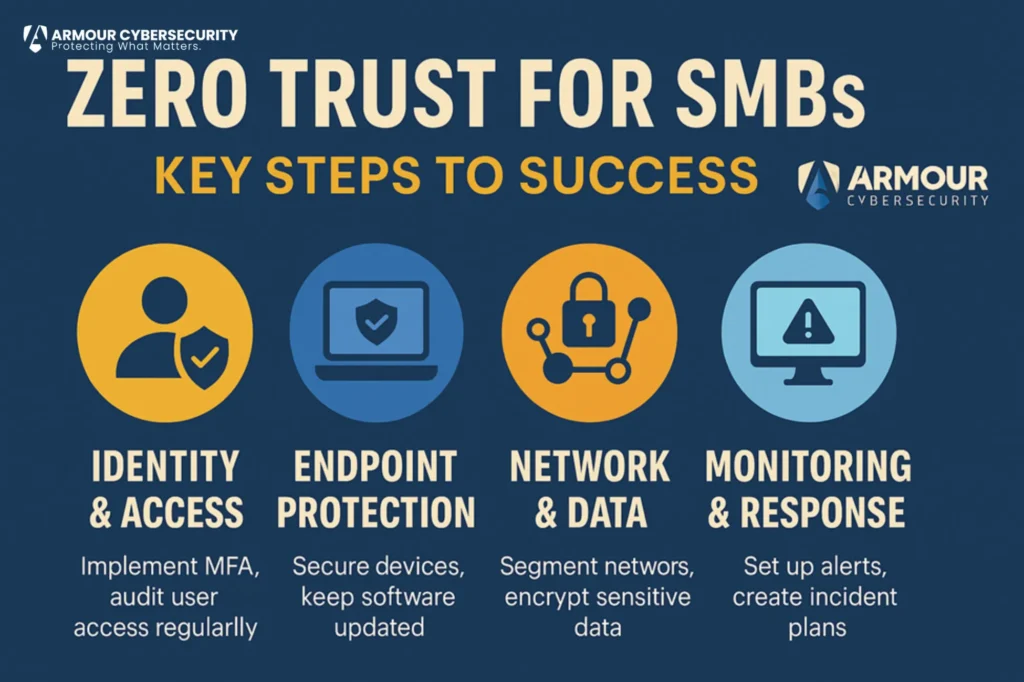
🔐 STEP 1: Start with Identity & Access Control
Goal: Know who’s logging in — and only allow what’s necessary.
- Enforce multi-factor authentication (MFA) for all users (especially admin and remote access)
- Implement least-privilege access: no one should have more access than they need
- Remove unused accounts and automate access revocation on employee exit
🔧 Tools to consider: Microsoft Entra, Okta, Duo, Google Workspace IAM
💻 STEP 2: Secure Your Endpoints
Goal: Ensure the devices accessing your systems are known, healthy, and protected.
- Require antivirus/EDR on all company-owned devices
- Block unmanaged or outdated devices from accessing critical systems
- Patch operating systems and applications regularly
🔧 Tools to consider: SentinelOne, CrowdStrike Falcon, Microsoft Defender for Business
🌐 STEP 3: Shrink the Attack Surface
Goal: Limit exposure across your network, apps, and data.
- Use network segmentation (e.g., separating guest Wi-Fi from internal traffic)
- Remove or lock down unused open ports and services
- Encrypt sensitive data in transit and at rest
🔧 Tools to consider: Firewalls with microsegmentation (e.g., Fortinet, Ubiquiti), VPNs with device trust
📊 STEP 4: Monitor, Audit, and Improve
Goal: See what’s happening — and respond quickly.
- Log and monitor sign-ins, privilege escalations, and data access
- Set up alerting for suspicious activity (e.g., impossible travel, repeated MFA failures)
- Conduct tabletop exercises for response readiness
🔧 Tools to consider: Microsoft Sentinel (for 365), Splunk, JumpCloud
💼 What Executives Need to Know
Even with a lean IT team, SMBs can absolutely adopt Zero Trust in a way that’s measurable and practical. But leadership must:
- Set the tone: Make Zero Trust a business priority, not an IT side project
- Define what “trust” looks like in your environment — for users, devices, vendors, and apps
- Allocate resources: Budget for identity, endpoint, and basic monitoring tools
- Ask the right questions:
- Who has access to our sensitive data?
- Can we verify every login, device, and session?
- Do we have visibility into abnormal behavior?
🚀 Conclusion: You Don’t Need to Be Big to Be Secure
Zero Trust isn’t about buying the most expensive tech — it’s about changing how you think about access, risk, and trust.
For SMBs, the smartest path is to:
- Start small (identity + device health)
- Build confidence with early wins
- Scale intentionally over time
Security doesn’t start with the tools — it starts with clear priorities and executive commitment.